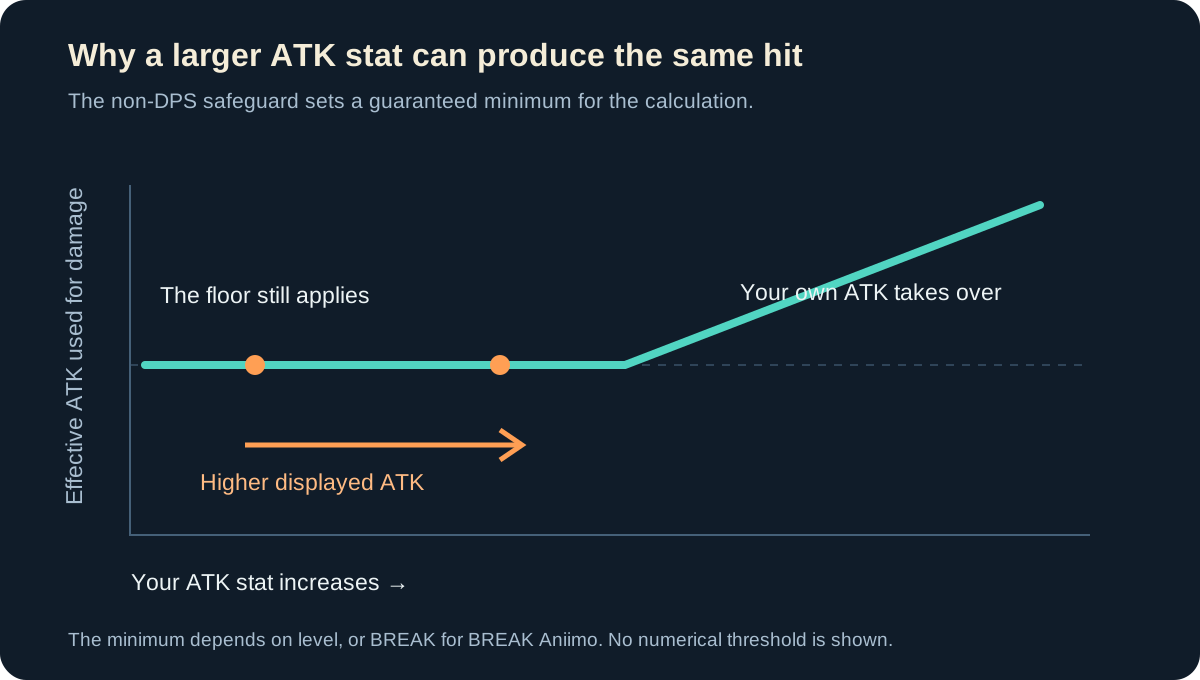
A higher displayed ATK can leave a non-DPS Aniimo dealing the same damage because the calculation already supplies a guaranteed minimum. If an upgrade still leaves the creature's own ATK below that minimum, the effective value used for the hit need not change.
That does not make the upgrade screen wrong or every ATK investment worthless. It means a test needs to distinguish the displayed stat, the effective stat and the team's overall result. The developers' October explanation describes exactly this gap, along with plans to make ATK increases affect damage more directly.
- Applies to
- The non-DPS damage safeguard
- Minimum based on
- Level, or BREAK for BREAK Aniimo
- Below the minimum
- More displayed ATK can leave damage unchanged
- Build decision
- Check the creature's role and skill effects
The displayed ATK and effective ATK are different values
The safeguard gives non-DPS Aniimo an ATK boost when their own value is low, helping their attacks get through enemy defenses. Its basis is level, except that BREAK Aniimo use their BREAK stat for this purpose.
If the minimum is still doing the work after an upgrade, a larger number on the stat screen can produce the same hit. Once the creature's own ATK becomes the relevant value, the comparison changes. The threshold depends on the creature's situation; the explanation does not give one universal ATK target for every non-DPS build.
The stats and roles explainer separates the stat names from the jobs a creature performs. Use that distinction before treating an unchanged ordinary hit as proof that the entire build made no progress.
What a controlled comparison actually needs
Keep the creature, attack and target the same. Then hold the combat state steady: the target's BREAK state, your active buffs and whether the hit is critical all affect what you are comparing.
| Comparison | What it can tell you |
|---|---|
| Same skill, same target, ordinary hits before and after ATK | Whether that change moves the comparable hit |
| Ordinary hit compared with a critical hit | A difference that does not isolate ATK |
| A hit before BREAK compared with a hit during BREAK | A changed combat window, not an ATK-only test |
| Different skills or skill levels | A different attack as well as a different stat |
Record several comparable hits. If the result stays unchanged, first confirm the conditions, then consider whether the non-DPS minimum explains it. Repeating a clean comparison is more useful than taking the highest number from two different fights.
Waleetle and Pawney show why the damage window matters
Some kits reward the timing of the attack as well as the stat behind it. These current effects make a BREAK-window comparison especially important:
| Effect | What it changes |
|---|---|
| Waleetle's Sandstorm Spin | 20% extra damage to BREAK targets |
| Pawney's Ironclad Armament | 10% EP recovery and 30% extra damage to BREAK targets for 15 seconds |
| Epic/Legendary Capacitous Battery at Lv 10 | Returns 20 UP after a 200-UP Ultimate through its 10% refund |
Moving a hit into one of those conditions can change its result independently of a small ATK upgrade. The combat guide covers how to align buffs, BREAK and resource use, while the Held Items guide explains the item side of the comparison.





The cards are starting points for reading the actual kits. They are not a requirement to put all three into one team, and a role label does not make every skill scale from the same stat.
Judge the upgrade against the creature's job
A BREAK opener, sustain slot and damage carry are solving different problems. If the reason a creature is in the lineup is to enable a reliable damage window, a personal-hit comparison is only part of the build's result.
For a BREAK-focused slot, check whether your team reaches its intended window reliably. For sustain, check whether recovery prevents the retreat or knockout that previously interrupted the sequence. For the carry, compare the attacks delivered inside the intended buffs and target state.
Use the team planner to give each slot a specific job. An upgrade should answer the encounter's problem, rather than simply raise the most familiar number on the screen.
Retest the announced calculation refinement
The developers plan to refine the safeguard so ATK increases have a more direct effect on damage. Keep your earlier comparison as a reference and rerun it after a relevant change is implemented.
A useful test record
Record the creature and form, skill and skill level, target, ordinary versus critical hit, BREAK state, active buffs, and the ATK value before and after the change. Those fields let you repeat the same comparison without attributing a different combat state to an equipment upgrade.