


Field Notes: discoveries and completion clues
Open an Aniimo’s Aniilog entry to find its research objectives, milestone rewards and Field Notes. Forms share their family’s research topics, while interaction animations remain tied to the selected form.
Field Notes are the named discoveries arranged around an Aniimo on its Aniilog screen. Catch the species for the first time to unlock its entry, then select a note to read the completion clue. Some notes can also track a target location. The separate Topics tab contains the repeatable Research milestones described below.
Field Notes on our Aniilog pages include photo objectives, wildlife interactions and research trials. For example, Celestis’s notes ask you to photograph it eating Starines and help Dr. Glass with his research. Emberpup’s notes include completing Sanctum: First Spark and approaching a wild Bonesky while twined with Emberpup.
Each Field Note card shows the objective, its Research Points and the discovery text beneath it. For playful reactions such as petting or tapping, scroll to Interactions below Aniimo Research; these follow the form you select.
Identification filters are a separate decision
If you are looking for release filtering at the identification machine, use what to keep before automatic release. The Research Crown tasks explained below are a different progression system.
How Research works
Research progress belongs to the Aniimo’s research family. Its forms share the same Crown meter and unlocked accessory-slot count, so you do not need to repeat the research tree for each form. Choose the family you want to customize before you start clearing topics.
- 1Open the Aniilog
Choose the Aniimo you want to research and open its Field Notes page in the Aniilog. The Crown in the upper-right corner shows its current completion tier.
- 2Open Topics
Select the notebook-and-pencil tab on the left. Its four to six rows are the active Research topics for that Aniimo.
- 3Clear milestones
Perform the action written on a row. Each completed milestone awards 10 or 20 Research Points, and some milestones include a separate bonus reward.
- 4Claim and check the Crown
Use Claim All Rewards when it activates, then return to Field Notes. Crossing a Crown tier unlocks the next accessory slot for that Aniimo.

The four Crown tiers
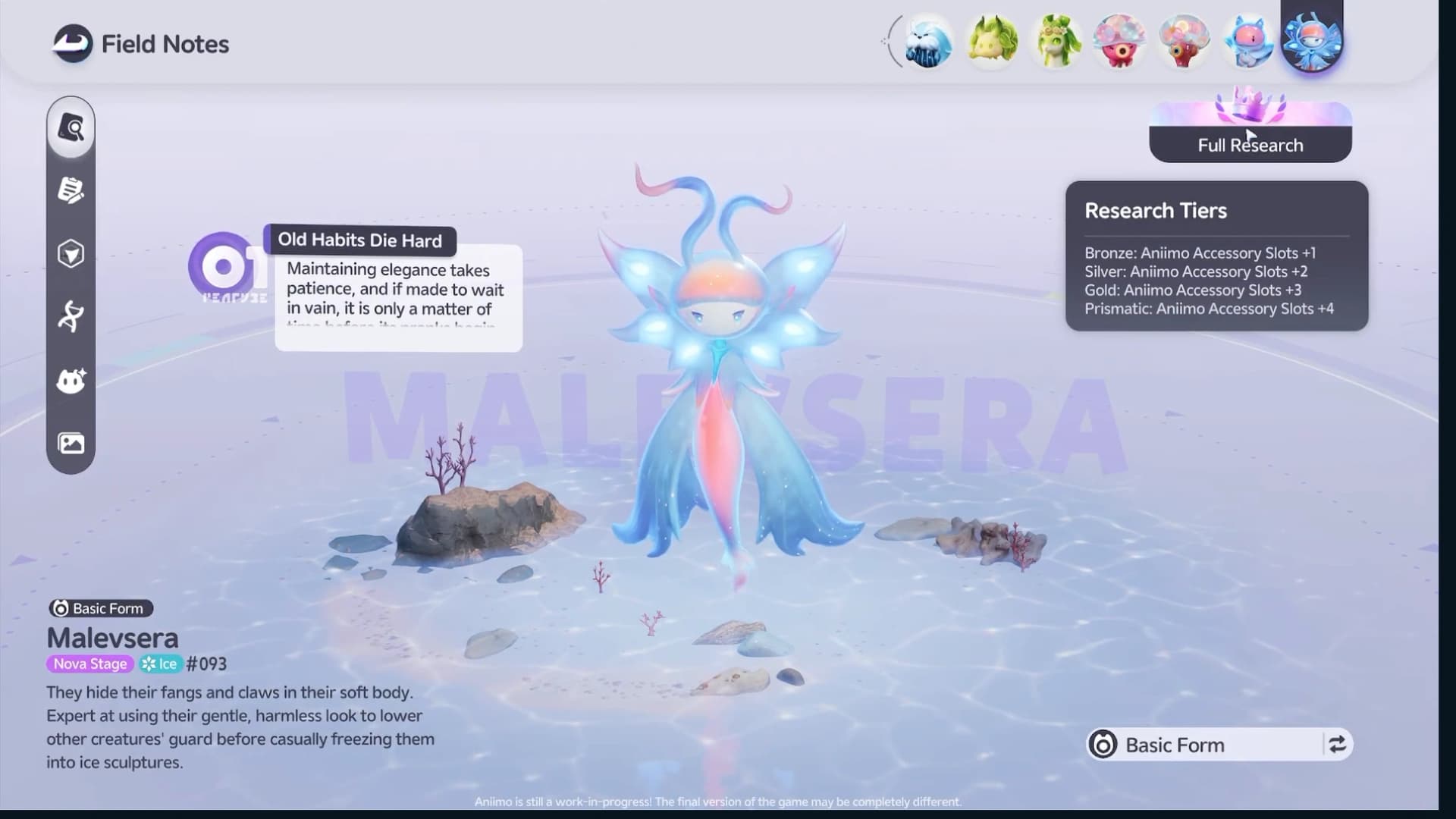
The Crown is the completion badge shown in Field Notes. The accessory slot is the mechanical reward attached to each tier, and the reward is cumulative. The screenshots below show Malevsera progressing through these tiers.

 Malevsera
 Accessory slots
- Bronze
- +1
- 2 accessory slots total
- Silver
- +2
- 3 accessory slots total
- Gold
- +3
- 4 accessory slots total
- Prismatic
- +4
- 5 accessory slots total

What counts toward Research
Each Aniimo has four to six topics. A topic is either a repeatable milestone ladder, such as skill casts, or a one-time collection objective, such as owning an elite Aniimo.
Cast counters
Use the researched family and the action named by the topic. Named-skill and Ultimate rows have their own requirements.
Use Skills
Use Ultimate
Use a named skill
Combat and catches
Meet the target and condition named by the topic.
Defeat this Aniimo
Catch this Aniimo
Catch an Alpha
Collection checks
Add the requested trait or form to your collection.
Own an elite Aniimo
Obtain a Sparkling Aniimo
Collect a Prismana form
Growth checks
Finish the stated evolution or progression step.
Complete an evolution
Complete two paths
The Gachapus tree below shows both sides of the system: repeatable combat actions and single-step collection checks on the same page.

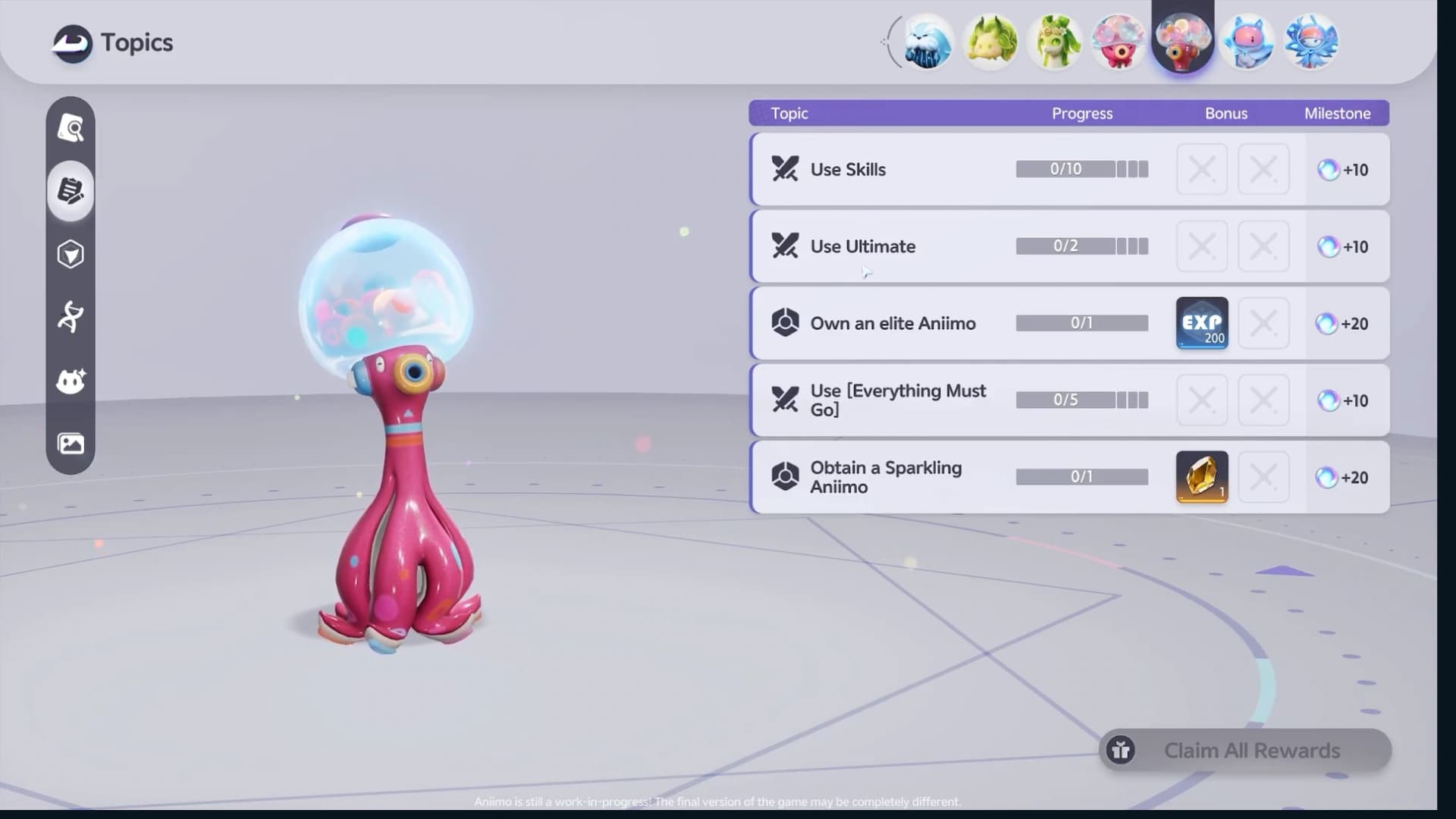
Repeated rows pay Research Points at several checkpoints, so the visible requirement rises as you finish each stage of that row. Every one-step row awards 20 points.

A faster Research route
Research advances naturally while an Aniimo is active, but a quick topic check prevents wasted field time. Use this order when you want the next slot rather than passive progress.
- 1Scan all topics first
Separate cast counters from goals that need a specific catch, evolution, trait, or form. The Crown meter needs points, not a fixed row order.
- 2Combine skill goals with ordinary fights
Use the researched family during combat and work on its skill-use, Ultimate and named-skill rows together. Check the topic counter after a fight to see which milestones are ready to claim.
- 3Save targets for real encounters
Defeat, catch, Alpha, and evolution topics carry an explicit condition. Fold those into your ordinary route instead of testing them on empty ground.
- 4Finish collection checks once
Elite ownership, Sparkling, and Prismana topics are one-off checks. Confirm the exact row before spending a rare catch or evolution resource.
- 5Claim before switching Aniimo
Collect every finished milestone, check the new Crown tier, and only then swap to the next species. That makes the new Appearance capacity immediately visible.

Use the unlocked accessory slots
Open Appearance, switch to the Aniimo tab, and select an unlocked slot before choosing an accessory. Every new Research tier expands capacity; it does not automatically equip an item.
Select Adjust on an equipped accessory to change its position, rotation, and size. Save the edit when the accessory sits correctly on that Aniimo’s model.

Frequently asked
Where can I find each Aniimo’s Field Notes tasks?
Open a species page in our Aniilog and choose Field Notes to find its photo objectives, encounters, discoveries and available completion clues. Related encounters show how that Aniimo can help with another species’s discoveries. The in-game Field Notes menu also offers tracking for some objectives.
How do I unlock more Aniimo accessory slots?
Open that Aniimo’s Topics page in the Aniilog, complete milestones, and claim the Research Points. Bronze, Silver, Gold, and Prismatic Research each unlock one additional slot. Forms in the same research family share progress and slot capacity, so you do not repeat the tree for every form.
What is the maximum number of accessory slots?
Five per Aniimo. Every creature starts with one slot, then the four Research tiers add one slot each for a maximum of five at a Prismatic Crown.
Which Aniimo should I use for Research skill tasks?
Use a member of the family whose research tree you are completing. Generic skill-use objectives are tied to that family; Ultimate and named-skill rows also specify the action to use. Defeat, catch and other topics require their own stated conditions.
Does a Prismatic Crown turn an Aniimo into a Prismana?
No. A Prismatic Crown marks full Research and unlocks the fourth extra accessory slot. Prismana forms and the Sparkling trait are separate collection systems.